Batch-Background-Remover-Tool
A downloadable tool
Batch-Background-Remover-Tool
ℹ️ What this tool does & how to use it (click to collapse)
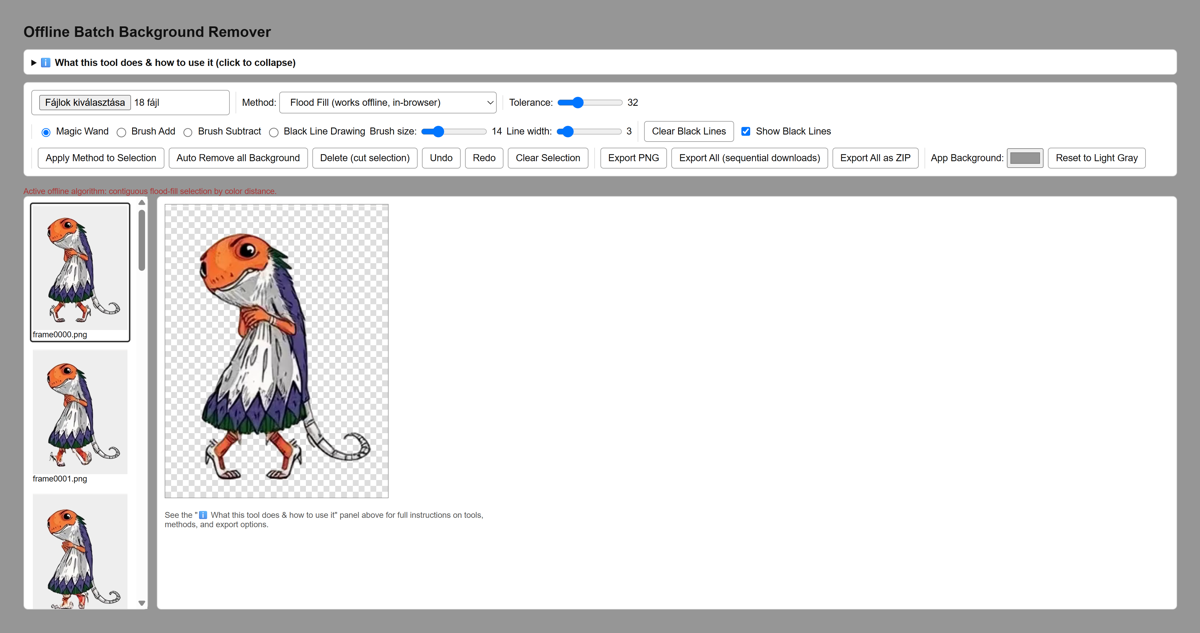
This is a fully offline, browser-based batch tool for removing backgrounds from multiple images at once. No images or data ever leave your computer — everything runs locally in this page.
1. Loading images
- Click the file picker and select one or more images. Each image becomes a separate job in the batch.
- All loaded jobs appear as scrollable thumbnails on the left. Click a thumbnail to make it the active image in the editor.
2. Background removal methods
- Flood Fill — the only method that actually runs in-browser. A contiguous color-distance fill, similar to Krita's "Contiguous Selection" tool.
- Rembg / HoneyClean / CarveKit — real AI tools, but they need a local Python/GPU server. They are listed for reference; selecting them shows a notice and the app falls back to Flood Fill.
- Removerized — a separate offline browser app, not embeddable here as a library. Same fallback applies.
3. Selecting the background
- Magic Wand — click anywhere on the image. It flood-fills all connected pixels within the Tolerance slider's color distance, selecting them (shown as a tinted overlay).
- Tolerance — higher values select a wider range of similar colors in one click.
- Brush Add / Brush Subtract — drag with the mouse to manually add or remove pixels from the current selection. Adjust Brush size as needed.
- Clear Selection — deselects everything on the active image without changing pixels.
4. Black Line Drawing (selection barrier)
- Pick the Black Line Drawing tool, set Line width, then click-drag-release to draw a straight black line on the image.
- The line is drawn permanently into the pixels AND marked as a barrier: Magic Wand and Auto Remove will never flood-fill across it, even if colors would otherwise match.
- Useful for separating a background region from a foreground object that touches it.
- Clear Black Lines removes the flood-fill barrier; use Undo to also remove the black pixels themselves.
5. Removing the background
- Delete (cut selection) — makes the current selection on the active image transparent.
- Auto Remove all Background — runs automatically on every loaded image in the batch: it seeds flood-fill from each image's corners/edges using the current Tolerance, then deletes the result. Fast offline approximation, not full AI segmentation — best for flat or near-flat backgrounds. Use Magic Wand/Brush/Black Line afterward to clean up complex cases.
6. Undo / Redo / Keyboard shortcuts
Undo/Redostep through every pixel-changing action (delete, line draw) per image, independently for each job.- Keyboard:
Delete/Backspace= cut selection,Ctrl+Z= undo,Ctrl+Y= redo.
7. Exporting results
- Export PNG — downloads the currently active image only, with transparency.
- Export All (sequential downloads) — downloads every image in the batch one by one as separate PNG files.
- Export All as ZIP — packs every processed image into a single
batch_background_removed.zipfile, built locally with no external library.
Download
Click download now to get access to the following files:
Development log
- Bug Fixes14 hours ago
- New offline Batch Background Remover is out15 hours ago
Leave a comment
Log in with itch.io to leave a comment.